

Displaying tags
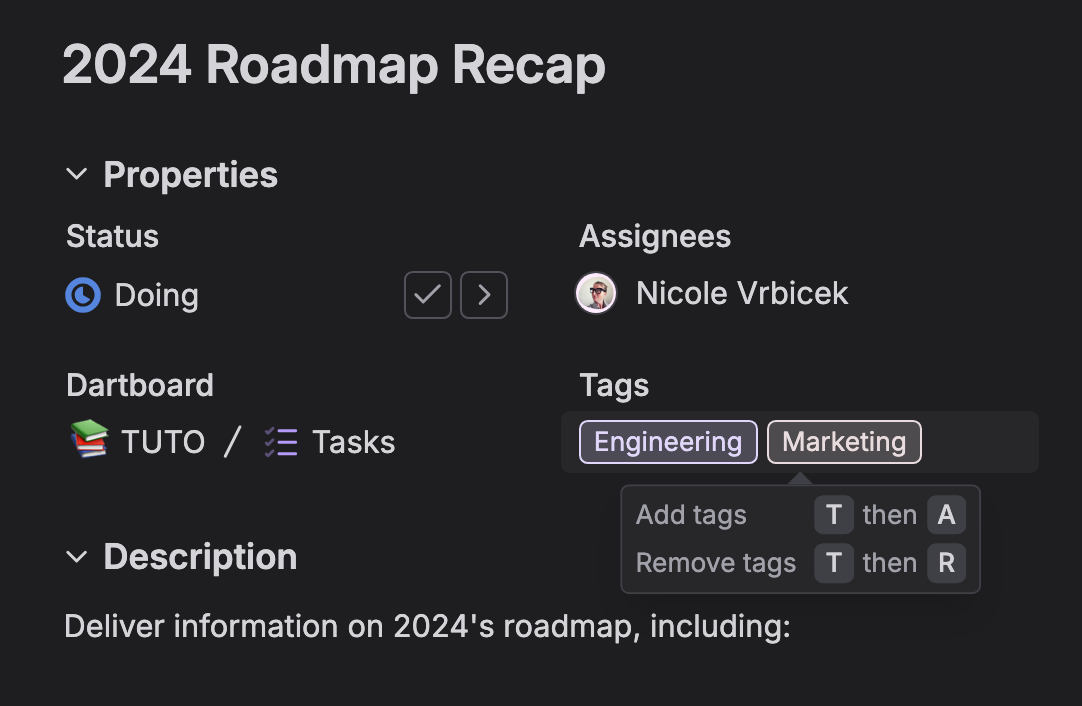
- Show tags in dartboard layouts: Enable them in the top-right dropdown
- Display tags by default: In individual tasks under settings > properties > tags
- Show tags: Below the main task title (under assignees, if visible)
Managing tags
- Add or remove tags: Hover over existing tags
- Click "none": Add a tag if none exists
- Adjust tag settings: From individual tasks by clicking the "more" icon
Organizing with tags
- Use tags: Group similar tasks together
- Filter and sort: Tasks by tags for faster navigation
- Improve project categorization: With consistent tag usage
There's more to see
Discover our other powerful features designed to boost productivity and efficiency
Filtering and Sorting
Zero in on what matters
Custom Properties
Structure task information however you need
Types
Customize task categories and workflows to match your process
What teams say about Dart
I've been using Dart for months now, and it is my #1 tool for managing my projects! Plus, the user experience is crisp and it's a pleasure to make, track, and then close out tasks :)

The AI takes the "work" out of project management. My team is finally on board.

I really enjoy using the app - it has replaced my other kanban apps because of the AI features. Auto fill properties and generate subtasks are a massive boon. I look forward to using Dart more!

I've tried dozens of task management apps, and Dart is by far my favorite. You can run every feature via keyboard shortcuts, deeply customize your layout, and easily separate work and personal tasks.
We use Dart for both team and personal tasks, and it ties with Slack as our most-frequently used app.

I daresay, the UI/UX is perfect and within a few minutes, I was completely sold. Working in this app is truly refreshing and the AI integration is shockingly helpful.

Dart's made it really easy to organize and manage tasks while capturing context.
It's naturally integrated into our workflows and has really helped with productivity. We used to use iNotes/OneNote but Dart’s speed, shortcuts, and intuitive flow had us using it daily within a week of onboarding.

I've witnessed firsthand the transformative impact of Dart's task management tool on our organization. Its integration of generative AI has been a game-changer, significantly boosting my team's productivity by streamlining administrative tasks.
Dart's continuous evolution excites me, and I highly recommend it to any organization seeking to minimize administrative overhead while maintaining detailed task tracking, including durations, dependencies, and resource allocation.

I got Dart setup in minutes and built myself automatic weekly sprints with some tasks recurring weekly, monthly, yearly or just one time.

As someone who has worked on multiple projects with distributed teams, I understand the challenges of project management. It's great to hear that Dart was designed to make this process easier for teams through its innovative use of AI.

Dart has been an impressive project management tool, offering a seamless and beautiful experience that fits perfectly for various needs. Its user-friendly design and efficient document handling make it a pleasure to use, prompting me to transition all my work onto it.
The tool's excellence has led me to recommend it to many friends, affirming its suitability and effectiveness for a wide range of use cases.

I haven't been this excited about a project management tool in a decade.

Dart is 10x faster and cleaner than any other way we've found to track our work. Dart has been super quick-to-setup and incredibly fast for us to use. Other task managers had too much of overhead.

THANK YOU!!! The chatgpt integration is amazing. I gave it enough context and prompting that it generated for me the exact daily plan for the next 90 days of building my startup MVP (with scary accuracy), and then Dart just created all the tasks for me. Thank you for this amazing and time saving capability.
This just saved me probably an entire weeks worth of headache and trying to get my self organized let alone actually get the work done.

Features like flexible views (kanban, timeline, docs), automatic status reports, and smart breakdown of tasks save a huge amount of time and eliminate manual busywork.

I’ve tried many other project management platforms and have always been frustrated by the overhead that comes with even the simplest of actions. With Dart though, creating, organizing, and planning tasks takes me a fraction of the time, especially with Dart’s easy-to-use keyboard shortcuts. The AI tools are also really powerful, and Dart keeps adding more and more capability there. Excited to see this keep growing!

Dart has changed the way I plan my work. With nearly 15 years of work in the Human Resources field, project management and prioritization is routinely the area that HR teams struggle with most.
Dart AI is the springboard I never knew I needed. The built-in AI capabilities make organizing projects, prioritizing work, and establishing robust documentation practices more manageable and allow for immense creativity. I'm able to collaborate with co-workers in ways not possible without the AI automation tools Dart provides. I'd recommend Dart to anyone needing help with their professional and personal project management needs.

Via the Dart integration, my whole training schedule was added to my workspace and subsequently synced to my calendar.

Dart is amazing! It’s much simpler and easier to use than other PM tools. The load time is impressively fast, and the keyboard shortcuts enhance productivity a lot. The UX is perfectly balanced, utilizing space and typography effectively to display the right amount of information on each page. Dart is a joy to use compared to other tools I’ve dreaded

Frequently asked Questions
Still not sure? Here are a few details.
