At Dart, we’re pushing the boundaries of what a project management tool can do. Our goal has always been to make your workflow feel like a second thought, not a chore. With v7.4, we’re introducing some of our most requested features yet: full Claude AI chat model support, native speech-to-text, and a proactive AI recommendation engine designed to find what you need before you even look for it.
Next-gen AI: Claude, voice, and the command center
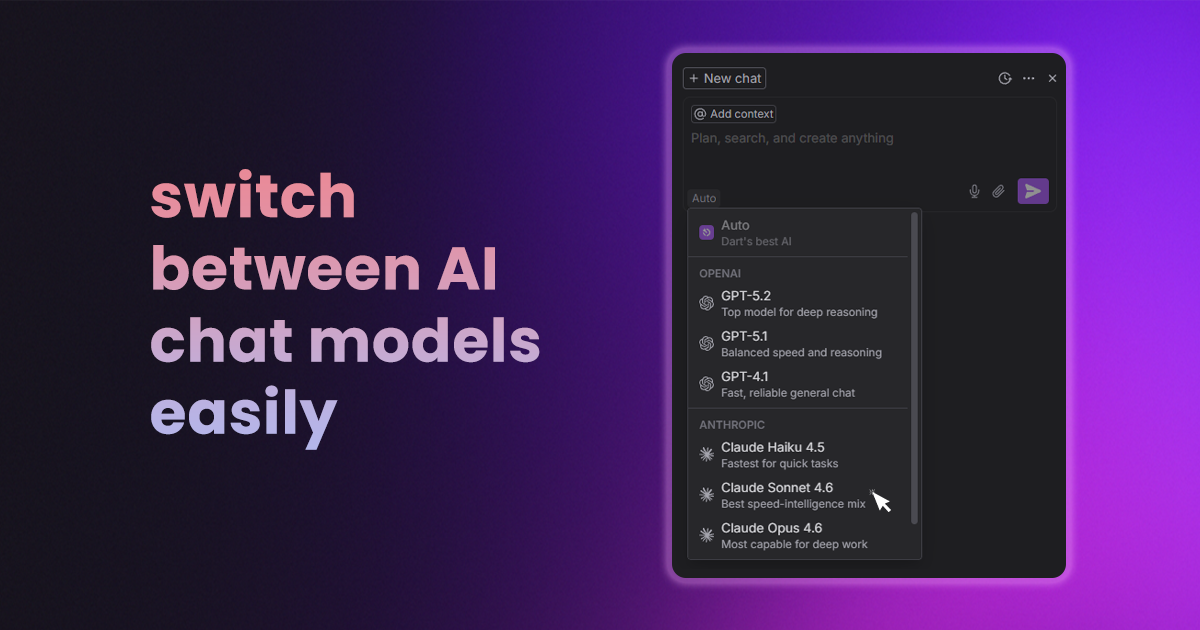
You can now toggle between models effortlessly using our new model switcher. Whether you prefer models from OpenAI or Anthropic, Dart adapts to you.
We’ve also brought the AI chat directly into the Command center, making it accessible from anywhere in the app with a single keystroke. Plus, for those on the move, our new Speech-to-text controls let you dictate tasks and commands as fast as you can think them.
Proactive intelligence & background agents
We're elevating Dart to be an active participant in your workspace. Our new AI content recommendations surface relevant tasks and context based on what you’re currently working on.
Behind the scenes, we’ve moved heavy lifting, like chat title generation and audio processing to background tasks. This means less lag and interruptions. We’ve even added "Thinking mode" to AI chat so you can choose between quicker or deeper modes of thought. Finally, we've added scheduled skills, allowing your Dart AI to execute routines automatically while you focus on deep work.
Precision editing & in-text AI
Editing within a task or document just got a major upgrade. You can now highlight any specific string of text and trigger Dart AI to edit, expand, or summarize that specific selection.
- Added a completely redesigned floating toolbar that stays out of your way until you need it
- We’ve switched task image generation to GPT-Image-1.5, utilizing base64 support for high-quality visuals that load instantly
- Improved checklist parsing and the ability to save empty descriptions for those who like to start with a blank canvas
Keyboard & performance
For the shortcut junkies, we’ve massively expanded our keyboard system. You can now navigate and manage your entire workspace without your hands ever leaving the keys.
- Use
Alt+1throughAlt+4to set priorities instantly - Move through lists using
Alt+JandAlt+K - Our left navigation bar is now virtualized. Even if your workspace has thousands of items, scrolling remains smooth
- Every shortcut is now fully compatible with all international keyboard layouts
More improvements
Beyond the big features, his release includes dozens of quality-of-life updates:
- Toggle between "indented" and "flat" views with a new "Expand All" button
- Reply directly to notification emails to update your tasks on the fly
- Now fully supported and visible in the calendar view
- Typeahead searches (@ mentions/tags) are now paginated for lightning-fast results in large teams
- Our MCP integration now supports seamless deployments, so your AI tools stay connected during updates
- Restored Cmd+Z / Ctrl+Z functionality inside the document editor
- Fixed the "teleporting" dropdown menus and iPad visibility issues
- Resolved an issue where dragging and dropping items was occasionally unresponsive
- Fixed a layout bug where the mobile sidebar was cutting off text on narrow screens
Dart v7.4 is our most robust version yet, designed to be faster, smarter, and more vocal. For the full technical breakdown, check out the full changelog here.
_light%201.avif)